Audit/Checklist Forms for Inspection and Compliance
Convert your current paper checklists or Excel spreadsheets into smart inspection forms in minutes. Our checklist manager feature makes it easy to create customized checklist forms with 6 response types, 23+ pre-built templates for Mining, Construction, and Trucking, and compliance settings that ensure inspections never get missed.
Build, Deploy, Inspect, and Enforce — All in One.
Custom forms, pre-built templates, compliance settings, mobile inspections, and auto work orders from failures.
Form Builder
23+ Templates
6 Response Types
DVIR Compliance
Fault Alerts
Mobile & Offline
Customize Your Templates to Get the Information You Need
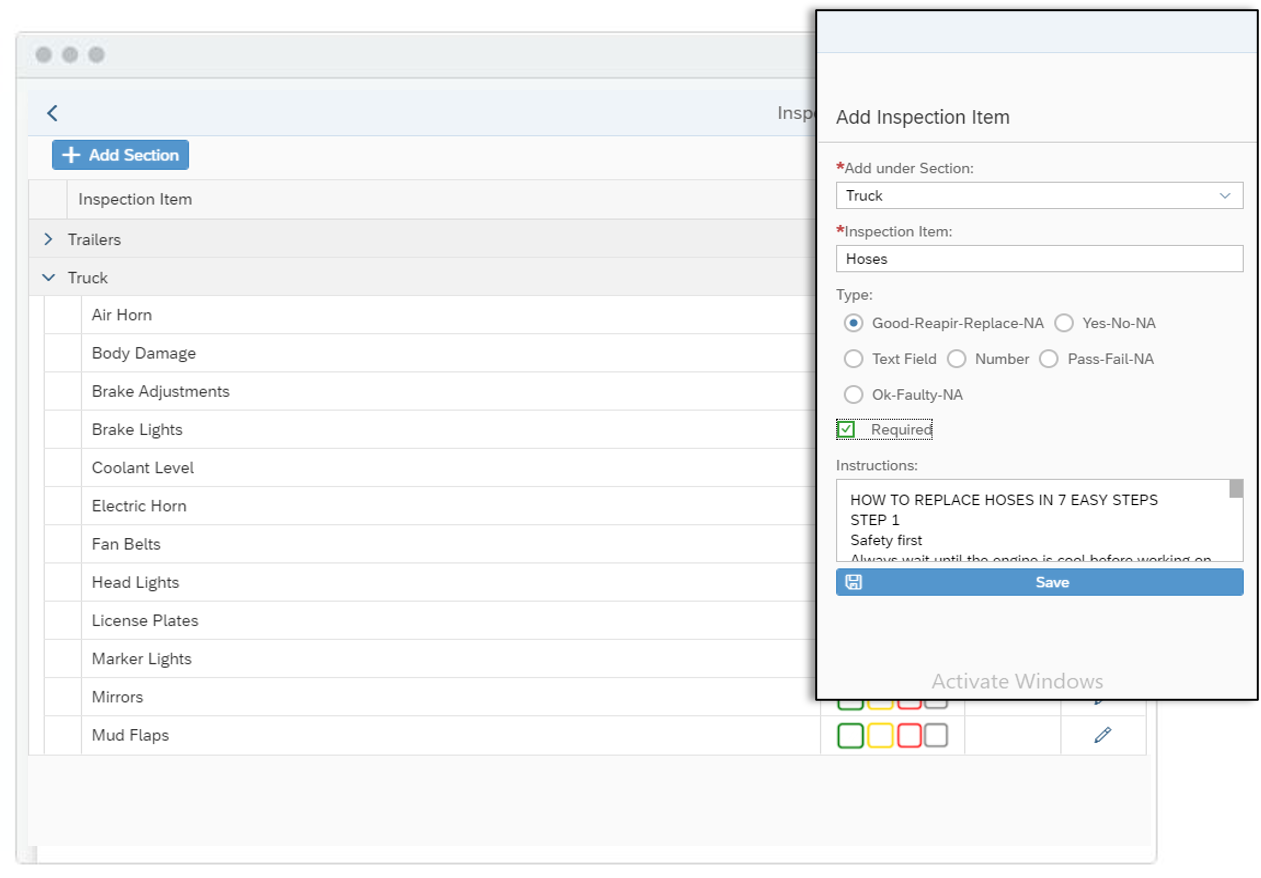
HVI lets you set different response types for your template, such as mileage and engine hours, single and multi-check, text boxes, multiple-choice and signature. You can also assign different forms to different types of assets to avoid confusion for your drivers and turn notifications on or off depending on fault severity.
Filter and Select From Our Extensive Template Library
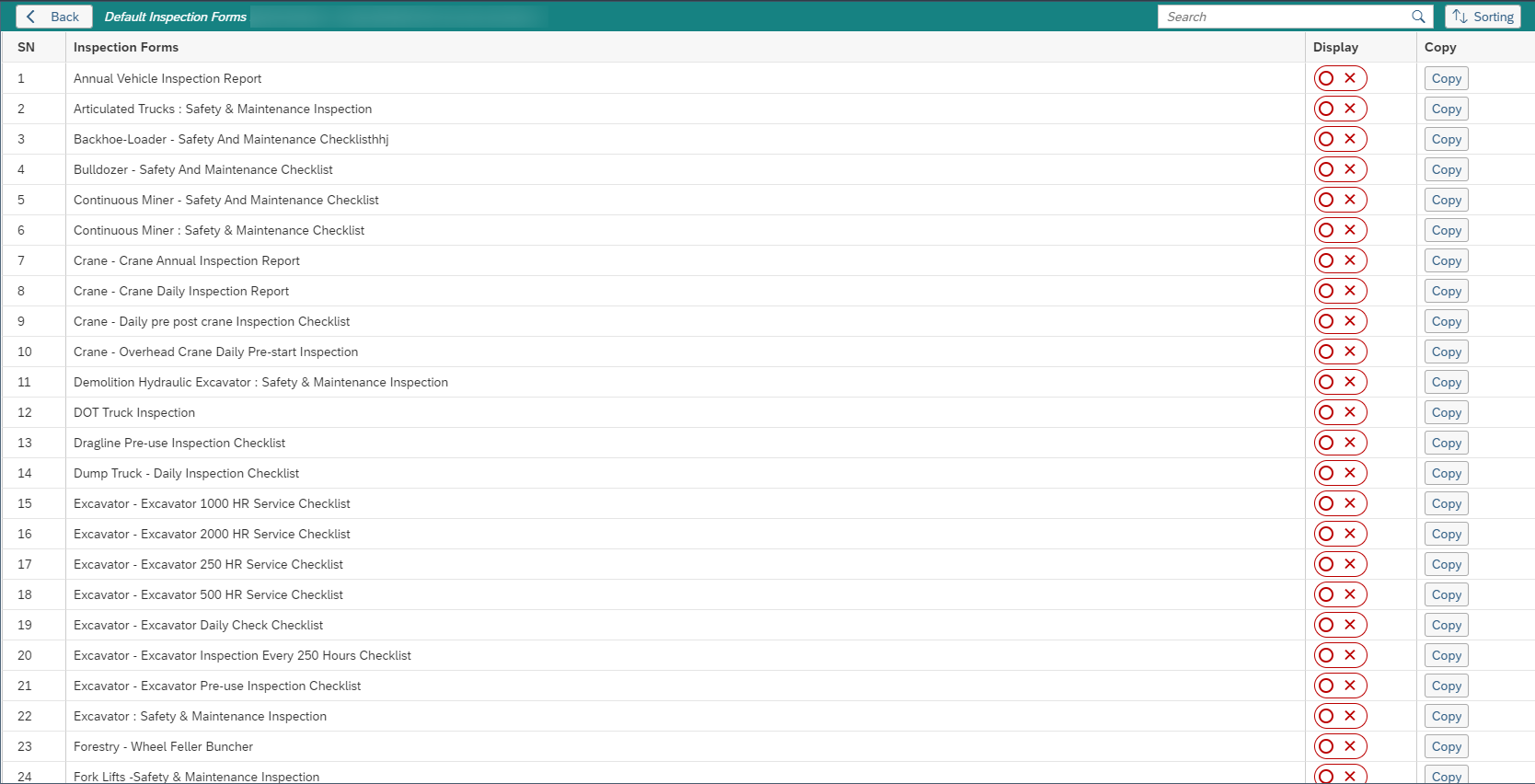
Choose a pre-made form from our extensive template library for any type of asset you need regular inspections carried out on. Our library of templates can be filtered by industry such as Mining, Construction, and Trucking and Logistics, or by purpose such as DVIR, Inspections, and Health and Safety.
51%
Accurate Utilization Tracking49%
Reduce DowntimeTurn On Compliance Settings for Peace of Mind
Exception reporting can quickly show you where your risk lies. Quickly and easily find the gaps in your DVIR history so you can do what's required to stay compliant. We'll also send you and your drivers alerts and reminders so that inspections get done.
Paper to Digital in 3 Steps
Build your form, set compliance, deploy to mobile — inspections start flowing.
Custom Form Builder
Build from scratch or 23+ templatesSetup Compliance Forms
Vehicle assignment & fault alertsDeploy & Inspect
Mobile, offline, photos, signaturesChecklists are Just One Module. Here's Everything HVI Does.
Digital pre-trip, DVIR, and daily inspections with photo evidence, voice notes, GPS, and signed PDF reports.
Work orders from inspection faults in one tap. Assign technicians, track labour, parts, and progress.
Real-time stock tracking, auto reorder, CSV upload, work order consumption, and 7 analytics dashboards.
Time-based and meter-based PM schedules. Automatic notifications. OEM interval compliance.
Daily shift reports with meter readings, runtime, downtime, defect items, and auto weekly PDF.
SAP, QuickBooks, Sage, GPS telematics, fuel cards, and OEM telematics. Connect to enterprise systems.
Save Your Time and Money by Choosing HVI App Software.
Custom form builder with 6 response types. 23+ pre-built templates. DVIR compliance with exception reporting. Fault severity alerts. Auto work orders from failures. Mobile and offline. 51% better utilization. 5,000+ satisfied customers. Free trial included.
Audit & Checklist FAQ
Common questions about HVI's checklist builder and inspection forms.
Add sections (e.g., Truck, Trailers) to organize your form, then add inspection items under each section. For each item, choose from 6 response types: Good-Repair-Replace-NA, Yes-No-NA, Text Field, Number, Pass-Fail-NA, or Ok-Faulty-NA. Mark items as Required and add step-by-step instructions.
23+ default inspection forms including Annual Vehicle Inspection, Bulldozer Safety, Crane Annual/Daily, DOT Truck Inspection, Excavator Service Checklists (250/500/1000/2000 HR), Fork Lifts Safety, and more. Filter by Mining, Construction, Trucking, DVIR, or Health & Safety.
Yes. Assign different forms to different vehicle types. Trucks get the DOT Truck form, cranes get the Crane Daily Report, excavators get the Excavator Checklist. Each vehicle type sees only the checklist relevant to them.
Turn on Compliance Settings to enable exception reporting that shows gaps in your DVIR history. The system sends alerts and reminders to drivers and managers, configures notifications by fault severity, and ensures DOT, FMCSA, and OSHA compliance.
Yes. When an inspection item is marked as failed, HVI auto-generates a maintenance work order with the defect details, photos, vehicle data, and operator notes attached. This closes the loop between inspection and maintenance.
Yes. Use the custom form builder to recreate your paper forms digitally in minutes. Add the same sections and items, choose response types, set required fields, and deploy to mobile. Drivers see familiar checklist items with photo capture, signatures, and auto reporting.
Yes. Drivers complete inspections on iOS and Android even without internet. Photos, signatures, and data sync automatically when connection returns. No inspections are lost at remote sites.
No. HVI allows unlimited custom checklists, inspection forms, templates, sections, inspection items, and completed inspections across all plans. No per-form or per-inspection fees.