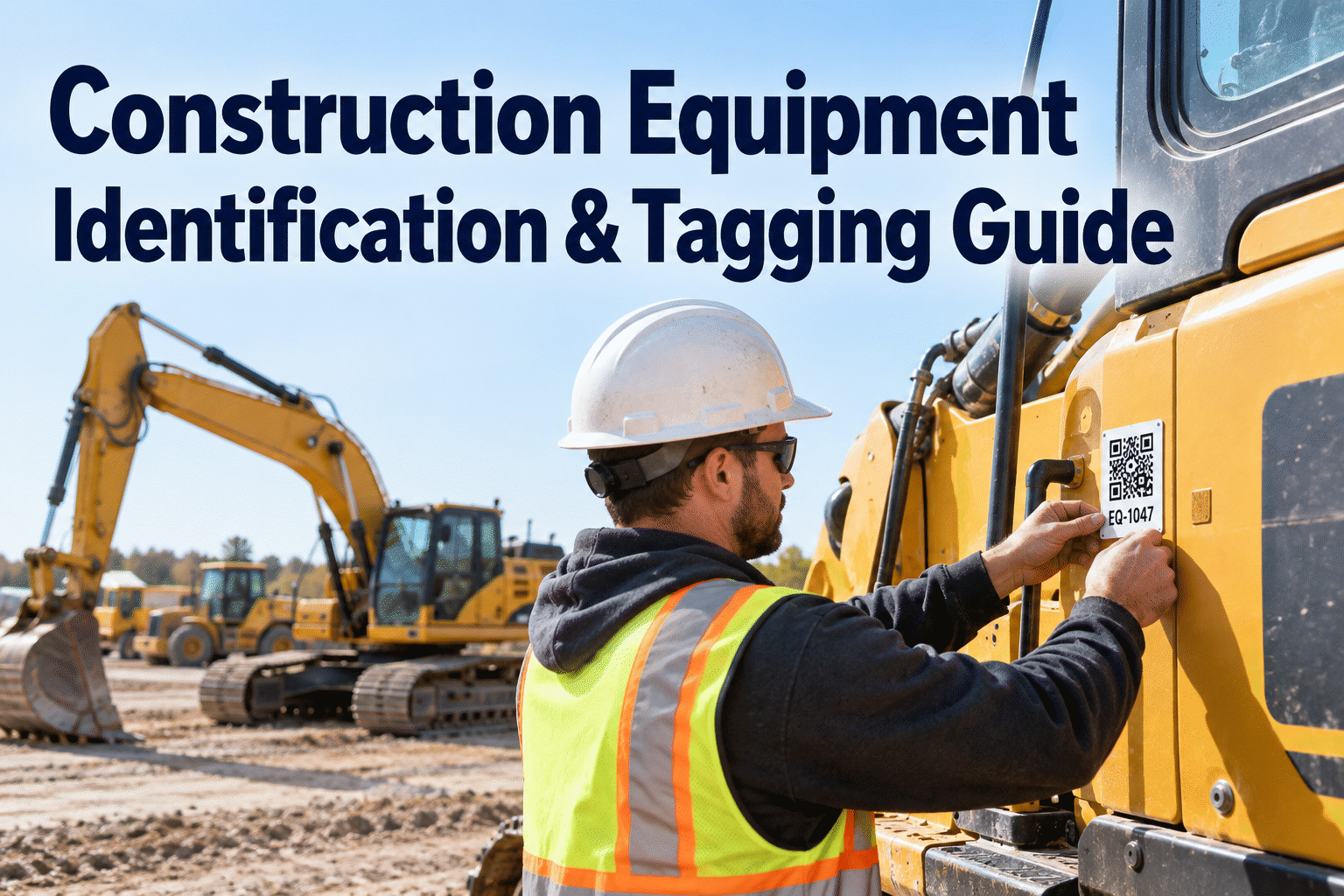
Equipment identification tagging gives every excavator, loader, generator and attachment a clear identity across jobsites. Without consistent asset IDs, crews can inspect the wrong machine, create duplicate records or lose track of repairs after a transfer. This guide covers numbering systems, durable labels, QR options and the maintenance records behind a reliable tagging program. Book an HVI demo to see how organized equipment records support the process.
One machine. One asset ID. Every record in the right place.
A durable tag helps crews identify the equipment. A consistent asset record makes that identity useful for inspections, service scheduling and work orders—wherever the machine moves.
Why equipment identification tagging mattersSmall naming errors can follow a machine for years
Construction equipment moves between yards, subcontractors and active sites. A crew may call the same loader “Loader 2,” “CAT 950” or “the north-site loader.” When each name creates a different record, maintenance planning becomes unreliable. A stable ID prevents confusion without replacing the manufacturer's serial number.
Three names, one excavator
Inspections, repairs and service dates can end up in separate records.
One primary ID: EXC-014
Different teams can use one consistent reference while keeping model and serial details.
Use the same asset ID on your daily inspection forms and maintenance work orders. Book a demo to see HVI equipment record workflows.
Build an equipment numbering system that scalesKeep the ID short, unique and independent of jobsite location
An effective equipment numbering system should be easy to read over a radio, easy to enter into a form and difficult to duplicate. Choose a convention before printing labels, then maintain a central register that assigns each ID once.
Four rules worth keeping
- Never reuse an ID after sale or retirement.
- Do not embed a temporary jobsite in the permanent identifier.
- Record the manufacturer serial number as a separate field.
- Apply one naming convention across machines, attachments and small assets.
Choose the right physical equipment tagDurability and visibility matter more than decoration
Printed asset labels
Simple text labels are inexpensive and easy to recognize. Use industrial materials suitable for dust, UV, oil and washing.
Metal identification plates
Engraved or stamped plates can offer better abrasion resistance on exposed machines. Fastening and placement still matter.
QR and barcode labels
Machine-readable tags can encode an ID or link to a record when paired with a compatible scanning process. Test readability on-site.
Placement checklist
Put the tag where operators can see it during pre-start checks, without covering safety decals or manufacturer plates. Avoid hot exhaust areas, moving components and surfaces that take direct abrasion. For large machines, consider a secondary visible marking.
QR or barcode scanning is an optional identification approach; confirm any scanner-to-software workflow separately. HVI's role here is organizing the underlying asset and maintenance records, not a claim of native QR scanning.
What belongs in the equipment register?A physical tag is useful only when its matching record is complete
| Asset ID | Equipment | Serial number | Current site | Maintenance status |
|---|---|---|---|---|
| EXC-014 | Excavator | Recorded separately | North earthworks | PM scheduled |
| LD-027 | Wheel loader | Recorded separately | Material yard | Repair open |
| GEN-006 | Generator | Recorded separately | West compound | Inspection current |
Also retain manufacturer, model, acquisition details, meter readings where applicable, responsible team and retirement status. Make the asset ID the consistent reference for inspection findings, maintenance work orders and service history. Book an HVI demo to explore organized asset records.
From tag to completed repairA practical identification-to-maintenance workflow
Identify
Operator checks the visible asset ID before starting an inspection.
Inspect
Inspection is recorded against the correct equipment record.
Repair
Maintenance team logs the issue and tracks the work order.
Preserve
Completed work stays in the machine's service history.
HVI supports digital equipment inspections, preventive maintenance scheduling and maintenance work orders. Start free to organize your construction equipment records.
Roll out tagging without disrupting the jobsiteA practical four-stage implementation plan
Find and reconcile
List active equipment, compare existing IDs and serial numbers, and resolve duplicates before creating labels.
Assign permanent IDs
Publish the numbering convention, designate an ID owner and document exceptions for rented equipment.
Tag and verify
Install labels during planned access, photograph placement and confirm every label matches the register.
Use IDs every day
Require the ID on inspections, repairs and transfers. Audit missing or damaged tags routinely.
Quick identification audit
- Can an operator read the ID without opening a panel?
- Does the label match the equipment register and serial number?
- Are open work orders attached to the correct asset?
- Is the location current after the latest site transfer?
- Is there a documented process for replacing damaged labels?
Where HVI fits into equipment identificationTurn consistent asset IDs into reliable maintenance administration
Equipment management
Maintain identifiable equipment records across a changing construction fleet.
Digital inspections
Help teams document equipment condition against the intended asset.
Maintenance work orders
Keep repairs and defects associated with the correct machine.
Preventive maintenance
Organize recurring service work using the machine's maintenance record.
Service history and reporting
Review past maintenance and fleet activity without confusing similar assets.
Tagging creates the identification standard; HVI helps maintain the equipment information behind it. Book a demo to review your fleet maintenance process.
Equipment identification tagging FAQsCommon questions from construction equipment managers
What is equipment identification tagging?
Equipment identification tagging is the practice of assigning each physical asset a unique ID and displaying that identifier on a durable label or plate. The same ID should appear in the equipment register, inspection records, maintenance work orders and service history.
What is the best numbering system for construction equipment?
A short equipment-class prefix followed by a unique sequence, such as EXC-014 or GEN-006, is often easy to manage. The key is consistency: do not reuse IDs, do not rely on temporary site names and retain the manufacturer serial number separately.
Should construction companies use QR codes or barcodes?
QR codes and barcodes can be useful when a compatible scanning workflow exists, but plain-text IDs should remain visible. Evaluate label durability, device access and the actual software process before adopting scanning. Do not assume a fleet platform supports native scanning without confirming it.
Where should heavy equipment asset tags be placed?
Choose a visible, accessible surface that is protected from excessive heat, abrasion and moving parts. Do not obscure manufacturer identification plates, warning decals or inspection access points. Follow the equipment manufacturer's placement guidance.
How does tagging improve construction equipment maintenance?
Consistent asset IDs reduce the chance of recording an inspection or repair against the wrong machine. They also help teams reconcile service history, plan preventive maintenance and manage equipment transfers. HVI supports the associated equipment records, inspections and maintenance workflows.
Make every inspection and repair traceable to the right machine
Start with clear equipment identification. Keep the matching inspections, maintenance schedules and work orders organized as your fleet grows and moves between jobsites.